Canon PowerShot S90
ƒ/2
6 mm
1/30
400

This is a very special artifact, the original Apollo Guidance computer display and keyboard (DSKY) unit removed from the primary Command Module simulator at the Johnson Space Center. Neil Armstrong and every Apollo astronaut used this DSKY in training for their mission.

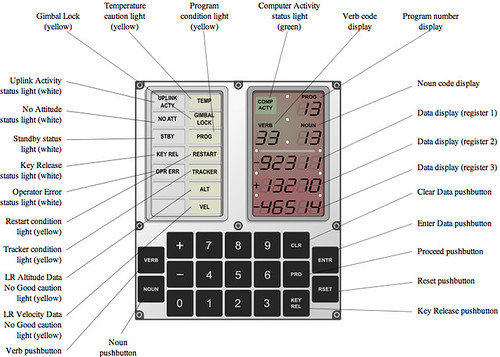
This is the user interface to the Apollo Guidance Computer. Two-digit verb-noun pairs were entered in succession to control the computer’s operation. It’s direct assembly programming with 1.1K FLOPS of processing power.

The DSKY provided the astronauts with critical burn times for engine firings, course corrections, trajectories, and other key calculations vital in getting a crew to and from the moon. It was also the DSKY that almost caused an abort of the Apollo 11 mission, as it was blaring a Program Alarm as Armstrong was trying to land the LM on the lunar surface.

One amazing historical footnote: “When production of onboard computers for the Apollo programme was at its peak, it consumed fully half of the world’s output of integrated circuits, yet only 75 units were constructed between 1963 and 1969. This is not because they were all used in the final machines [three DSKYs per flight], but because NASA bought vast numbers of the tiny devices from the manufacturers and hammered them with a barrage of tests to force ever higher quality control.”
How Apollo Flew to the Moon, 2nd Ed., p.166.

This DSKY is accompanied by a 1984 letter of provenance from Ron Baker of NASA’s Technology Utilization Support Section which reads: “This specific number has some history behind it. Based upon the I.D. Number from the back of the unit (#186372), I was able to confirm that it had been removed from the Apollo CM trainer that was originally located in Building 5 here at JSC. I was part of the team that disassembled the simulator several years ago… this computer unit was fully functional when it was in the simulator.”

An artifact in the Future Ventures’ 🚀 Space Collection. More images and background below.

21 responses to “Apollo DSKY from CM Simulator”

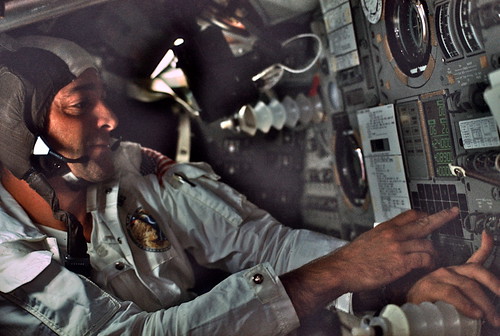
  1. DSKY in use on Apollo 17
    dsky_AS17-162-24042

    DSKY Labeled
    (and online simulator and a backup)

    The computer is more like an embedded controller, tightly integrated into the spacecraft systems. It calculated internally in metric and converted to English units for display. Here’s the verb-noun list, printed on a nearby panel. There were 44 programs, hand crafted from 15 bit words, processing at effectively 80 kHz with 64 kB of memory. (I also have a core memory module posted here. All of the 2800 ICs were 3-input NOR gates).

    For example, programs 61 to 67 control descent to the surface; 51 to 54 align the guidance system. Several programs would run simultaneously, and they could call on each other. Instructions were entered with verb- noun pairs. For example, during launch, Program 11 monitored ascent and the CMP punched in Verb 06, Noun 62 which had the computer display the three values of speed, height and the rate of height change (h-dot).

    From David Woods’ How Apollo Flew to the Moon, 2nd Ed., p.168.

    “All interaction between the crew and the computer was by way of the DSKY. Three displays, each with five digits, allowed the crew to se what data they were entering into the computer, or showed the result of the computer’s efforts. To keep the machine’s programming simple, there was no facility for the decimal point. Number entry and readout could be in octal (base-8) or decimal and was pre-scaled with the position of the decimal point assumed. It was left to the smart astronauts to know where it should be.

    Apollo crews came to respect the computer’s reliability and capabiity. David Scott said in 1982. “With its computational ability, the computer was a joy to operate — a tremendous machine. You could do a lot with it. It was so reliable, we never needed the backup systems. We never had a failure, and I think that was a remarkable achievement.”"

    The flight computer also controlled the FDAI, or "8-Ball" that indicated the orientation of the spacecraft. The FDAI is right above the DSKY (as you can the A17 photo above).

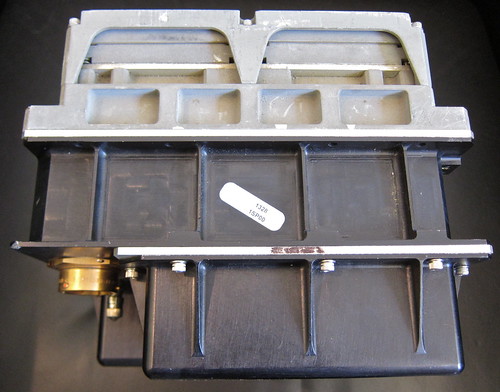
    DSKY top view… it’s deep and heavy: 17.5 pounds, 8" x 7" x 7"
    IMG_5918

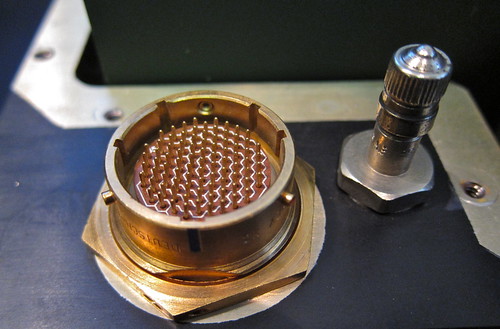
    The bike tire valve is for pressurizing dry nitrogen, a common feature in Block II electronics to remove sparking fire risk in the pure oxygen cabin environment:
    IMG_6214

    R•R description of this particular DSKY:
    "Training on the DSKY was critical for every aspect of the mission. This was the astronaut’s interface, allowing access to the Apollo Guidance Computer developed by MIT. The device permitted the astronauts to collect and provide flight information necessary for the precise landings on the moon. These units were also used on the Skylab missions. It is nearly impossible to overstate the importance of the DSKY interface to the success of the Apollo program, with this artifact rarely offered—with only about 75 believed ever to have been manufactured, at an original cost to the federal government of more than $200,000. Every Apollo crew member, including Armstrong, Aldrin, and Collins, trained for hours in that simulator on this piece of equipment, as it was one of the most important and critical instruments to landing a man on the moon."

  2. A most excellent presentation ..thanks.
    Now spark that thing up….you know you want to…

  3. indeed! 🙂

    the interface sounds complicated now, though better than the Ural that charles simonyi first worked on.

  4. Took a lot of work and testing, I see…

  5. I call foul on that wikipedia picture. The real DSKY used electroluminescent displays, like in the real-life photo, not the LCD-look in that diagram. Can you power that unit, Steve so we can see it light up? 🙂

  6. Super bit of history. Amazing what and how things were done back in the Apollo time frame. Still can’t believe that after 45+ years – humans have not returned to the moon.

  7. We have lacked good reasons to go. But we now know there is water, and He3… but I suspect the main attraction now might be the tourism. One commercial seat has been sold for a translunar flight, and the trip should get a lot cheaper in the next five years. You would get great views and a lot of space time with the main attractor in our vicinity…

    And yeah, you all know me well. I need to fire this puppy up! Anyone know the voltage for these displays? I have a couple high voltage converters for the flexible electroluminescent displays:
    Aqua

    And I have started the disassembly
    NASA KEYBOARD MODULE

  8. I think i’ve got the service data for this… Im sure its out there on the web

  9. Here you go!! More about the AGC though.
    klabs.org/history/ech/agc_schematics/index.htm

    Bit more here..
    klabs.org/history/history_docs/mit_docs/index.htm

    Appears the segments are driven via latching relays which is decoded via a 15bit code, serial?
    Guess its going to be somewhere between 90 and 150V AC for the actual display, has it got an inverter built in to do this?
    Maybe make one of these to bring it back to life.
    klabs.org/history/build_agc/

    That multipin connector on the rear looks the same variety as used on a Digidesign Profile mixing console that links the brain to the surface. Gives us no end of trouble with bent pins and broken cores..More to do with the ham fisted sound engineers that use it though…

  10. Interesting hobby….(!)

  11. [http://www.flickr.com/photos/gonzini] – thanks! Great resource there. Warms my heart that the guy who posted the schematics built a replica, and it took him four years! I wonder is if only used NOR gates like the original? =)

  12. and it was nice to see the DSKY front and center in the play simulator at Chabot

    P1000460

  13. I thought this was yours working for a minute…

  14. and now there is a project to recreate the EL display on GoFundMe

  15. I just linked this to one of Frans youtube videos on this. I guess you know of each other now anyway!

  16. Yes! The owner has been emailing me the progress updates. I have a complete AGC too, so I am curious to see that powering up project and the inner views

  17. And an even cooler DSKY power-up video. The screen is super crisp! youtu.be/feRCZyLzAwA

Leave a Reply to Astrocatou Cancel reply

Your email address will not be published. Required fields are marked *